• This is default featured slide 1 title

    Go to Blogger edit html and find these sentences.Now replace these sentences with your own descriptions.This theme is Bloggerized by NewBloggerThemes.com.

  • This is default featured slide 2 title

    Go to Blogger edit html and find these sentences.Now replace these sentences with your own descriptions.This theme is Bloggerized by NewBloggerThemes.com.

  • This is default featured slide 3 title

    Go to Blogger edit html and find these sentences.Now replace these sentences with your own descriptions.This theme is Bloggerized by NewBloggerThemes.com.

  • This is default featured slide 4 title

    Go to Blogger edit html and find these sentences.Now replace these sentences with your own descriptions.This theme is Bloggerized by NewBloggerThemes.com.

  • This is default featured slide 5 title

    Go to Blogger edit html and find these sentences.Now replace these sentences with your own descriptions.This theme is Bloggerized by NewBloggerThemes.com.

How to Revise Jailbroken iPhone’s Sales Region?,Download and install the latest 3uTools

his tutorial aims to teach you how to change the sales region on jailbroken iPhone.

Warm prompts:

*First of all, you need to jailbreak your iPhone and make sure that your iDevice has installed AFC2.

*iDevice’s sales region can not be changed if you meet with the problem that Cydia is hidden by JS.

*This tutorial will take iPhone4 as an example.

Operations:

Step1: Download and install the latest 3uTools on your PC. Connect your iPhone to PC using the USB cable.

Step2: After it’s connected, please click “Install AppSync”.

This tutorial aims to teach you how to change the sales region on jailbroken iPhone.
Warm prompts:
*First of all, you need to jailbreak your iPhone and make sure that your iDevice has installed AFC2.
*iDevice’s sales region can not be changed if you meet with the problem that Cydia is hidden by JS.
*This tutorial will take iPhone4 as an example.
Operations:
Step1: Download and install the latest 3uTools on your PC. Connect your iPhone to PC using the USB cable.
Step2: After it’s connected, please click “Install AppSync”.
Step3: After it’s installed, click “iDevice”→“Files”→”File System(Jailbreak)”→”Private”.
Step4: Click “Mobile”→”Library”→”Cash”→”com.apple.MobileGestalt.plist”.
Step5: As shown below, you need to revise the following information on3uTools.


Step6: After it’s revised, please remember to save your revisions.
Step7: Please restart your iPhone, open the “Settings” of your iPhone→click “General”→”About”, and then you may find that your iPhone’s sales region has been changed.


Step3: After it’s installed, click “iDevice”→“Files”→”File System(Jailbreak)”→”Private”.


Step4: Click “Mobile”→”Library”→”Cash”→”com.apple.MobileGestalt .plist”.


Step5: As shown below, you need to revise the following information on3uTools.


Step6: After it’s revised, please remember to save your revisions.


Step7: Please restart your iPhone, open the “Settings” of your iPhone→click “General”→”About”, and then you may find that your iPhone’s sales region has been changed.


The list below illustrates the feasible model number:


Share:

SAMSUNG SM-G925A Z3x octopus best dongle etc all time error solution Samsung Tool PRO v.27.7

Waiting ADB device... Ok
Reading phone info...
Model: SAMSUNG-SM-G925A
Android version: 5.1.1
Product code:
Phone version:
PDA version: G925AUCU3BOI2
CSC version: G925AATT3BOI2
CSC country code: USA
CSC sales code: ATT
HW version:
Phone SN: RF1D45EJGGR
Chip name: EXYNOS7420
Modem board:
RF cal date:
IMEI:
Checking Super user right... true
Reading NV data... Ok
Checking NV data... error
Security damaged (1)
Done with Samsung Tool PRO v.27.7

 write nv data from working phone

 SM-G925A unlock done. Samsung AT&T Samsung SM-G925A unlock done by Z3X.No need root just click UNLOCK & enjoy

 ETS is dedicated to provide Samsung SM-G925A Battery with high quality and low price. It's your perfect choice to buy Galaxy S6 Edge SM-G925A Batteries in ... For Sony Xperia Z3 Compact Front Housing Adhesive Replacement - Grade R.

Z3X SAMSUNG PRO. Direct unlock Galaxy S6, Edge G925A G920A G9

Big Chimera update, S6 unlock, BBOS10 bugfix ...


Unlock ROOT Samsung Galaxy S6 G920A ...

1

Samsung-sm-g925a unlock done


Sm-g925a unlock done


Share:

How To Customize your iOS 10 Control 2017 Apk All Devices Support


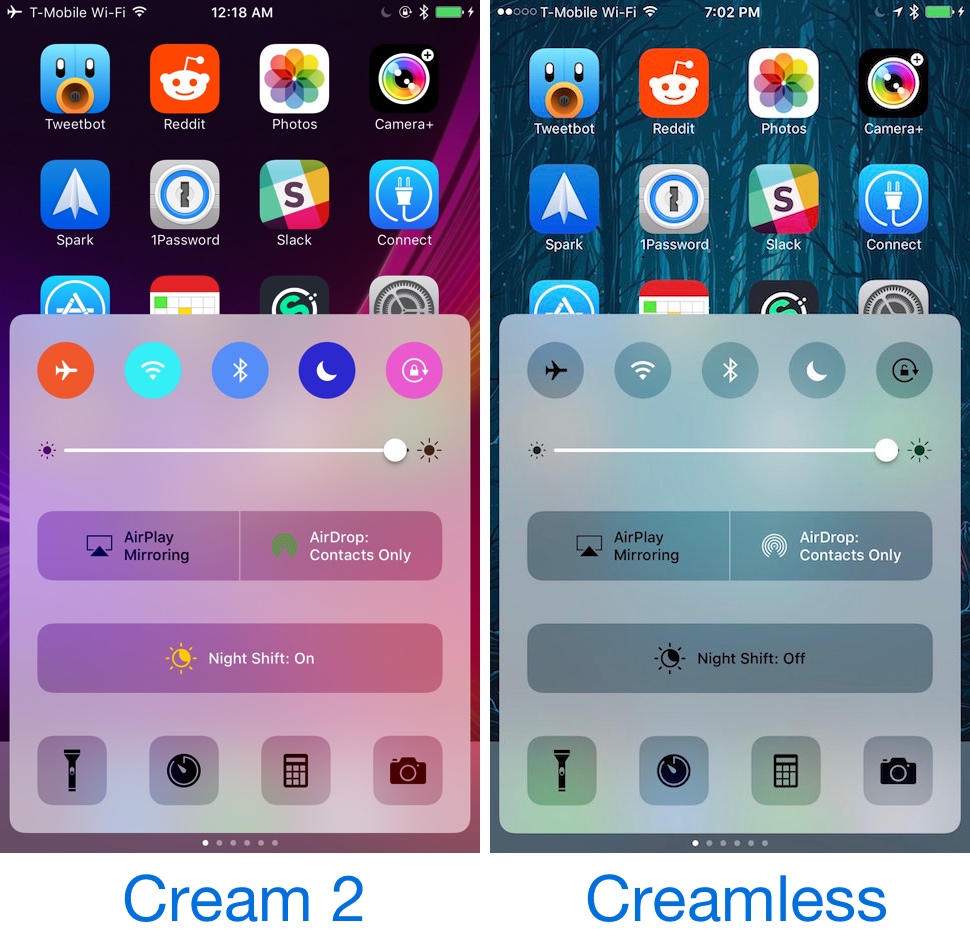
Starting with iOS 10, your Control Center toggles are colored whenever they’re toggled on. This includes the toggle buttons at the top, in addition to the AirSharing buttons and the Night Mode toggle.

Compared to the old look on iOS9 (shown on the right), you see that the new Control Center is cleaner and more visually appealing, with better contrasting buttons, sharper text, and rounded edges.

The Control Center also incorporates 3D Touch into the app buttons arrayed along the bottom edge. Press and hold the camera button, for example, and you can do stuff like take a photo or record a video.

The Second Panel: Apple Music

Dedicated to Apple Music, the second panel of the Control Center contains the controls for music playback and volume.
After a song is played on Apple Music, the panel will be filled out with the information on the playing track, including the name of the artists and the album from where it was taken.
There is also the option to broadcast the song through the bottom button of the panel, with compatible devices including connected Bluetooth speakers or the Apple TV.
- See more at: http://www.techtimes.com/articles/177692/20160915/ios-10-control-center-quick-guide-heres-how-to-use-it-and-its-hidden-features.htm#sthash.0csbogCn.dpuf

Compared to the old look on iOS9 (shown on the right), you see that the new Control Center is cleaner and more visually appealing, with better contrasting buttons, sharper text, and rounded edges.

Cream 2 and Creamless Control Center Toggle Tweaks

On the other hand, anyone who doesn’t like the appearance of the new colorizations in Control Center in iOS 10 and is jailbroken with the beta iOS 10.1.1 jailbreak by Luca Todesco can use one of two new free jailbreak tweaks called Cream 2 and Creamless to either customize all of Control Center’s colors or disable them altogether.

Cream 2

Cream 2 is similar to the original Cream jailbreak tweak, which would let you colorize your Control Center toggles to your liking.

Although they’re already colored out of the box, Cream 2 will let you configure custom colors that your device doesn’t have already, which means you get the added benefit of personalizing your iOS 10 Control Center experience.

cream2-1

Cream 2 will put a preferences pane in your Settings app where you can configure the toggle buttons colors to your liking:

Cream 2 Preferences Pane

Options exist for the following Control Center elements:

  • AirDrop

  • Airplane Mode

  • AirPlay

  • Bluetooth

  • Do Not Disturb

  • Night Shift

  • Rotation Lock

  • Wi-Fi

After you’re all set configuring your custom colors, you can tap on the blue Respring button at the top right of the preferences pane to respring and save your settings.

Creamless

The end result of Creamless, on the other hand, is a set of monotonous-looking Control Center toggles, but for people who aren’t fans of all the extraneous colors that pop up when you start turning things on or off, this might be just what you’ve been looking for.

Compared to the old look on iOS9 (shown on the right), you see that the new Control Center is cleaner and more visually appealing, with better contrasting buttons, sharper text, and rounded edges.

The Control Center also incorporates 3D Touch into the app buttons arrayed along the bottom edge. Press and hold the camera button, for example, and you can do stuff like take a photo or record a video.

Creamless

With the tweak installed, toggles will glow a blander light gray color rather than glowing all sorts of colors that scream, like blue, orange, purple, and red.

Creamless doesn’t have any options to configure, so there isn’t a way to toggle it on or off. As soon as you install it, it will remove those colors from Control Center and they’ll remain that way until you remove the tweak via Cydia.

Personally, I think I like the effects of Creamless a bit more because the colorless attitude of Control Center seems a little less overpowering, but if you would rather use custom colors than the stock ones, you’ll probably enjoy Cream 2 more.

If you’re interested in downloading Cream 2 or Creamless on your jailbroken iOS 10 device, you can do so for free from Cydia’s BigBoss repository right now.

Will you be customizing your Control Center toggle button colors, or negating them entirely? Share in the comments below!

iOS 10 Control Center Quick Guide: Here's How To Use It And Its Hidden Features

Share:

All Apple device 2017 New Tips3UTools How to Download Apps Without Apple ID & Password

Problem Description:

In the past, iOS users could download free apps without being asked for a password. However, recent iOS updates force users to type their passwords every time they download apps from the store, no matter if it is a paid app or not. Now, downloading free apps without entering your password is possible. This tutorial aims to introduce how to download Apps without Apple ID & Password.

Solutions:

Method A: Firstly, you can sign out Apple ID. Launch App Store on your iPhone→pull down this page→find and click Apple ID→click Sign Out.

Method B: Launch Settings app on your iPhone→click iTunes & App Store→click Apple ID→click Sign Out.

Method C: Download apps using 3uTools.

a. Download and install the latest 3uTools on your PC, connect your iPhone to PC using the USB cable.

b.Click “Apps”, 3uTools will show you different kinds of applications for you to download. You just need to click “Install” to download and install your wanted apps. By the way, you can manage iPhone’s apps using 3uTools.

A new ‘Password Settings’ section has been discovered in the Settings app of the current iOS 8.3 beta which will permit users to set up their iPhone, iPod touch or iPad so that downloading free iTunes apps and iTunes media won’t require an Apple ID password.
The new option is only exposed to users when Touch ID is disabled, reports 9to5Mac. With Touch ID enabled, the new option is unavailable.
This is understandable to an extent, because approving purchases — free or paid — with the tap of a fingerprint is a frictionless experience.
Nested right inside the iTunes & App Store section in iOS 8.3’s Settings app, the new ‘Password Settings’ subsection contains much welcomed changes to the way Apple treats free app and iTunes media content downloads.
There, you’ll find an altogether new Require Password option.
Flip the switch to ON and the App Store and iTunes will let you download free apps from the App Store, free books from the iBooks Store and free music, movies and television shows in the iTunes Store without entering your Apple ID password.
The new option apparently is not showing up in all regions yet. It’s worth mentioning that paid apps and iTunes content still require a password or Touch ID authentication.
In addition, this section also includes another option to require a password for additional purchases (Always Require and Require After 15 Minutes), including In-App Purchases, after making a purchase with your Apple ID.

Share:

Lg LS775 Unlock done By GC Pro No Root Required

We offer remote simlock unlocking for LG with the use of a code entered on the phone's keypad. The service is available for Alcatel Apple iPhone Asus AT&T BlackBerry Coolpad Dell HTC Huawei Kyocera Lenovo LG Microsoft Modem Huawei Motorola NEC Nokia Samsung Sony and ZTE.

How to remove a simlock?

1. Select mobile brand
2. Select phone model
3. Fill in and send the form
4. Make the payment

The simlock unlocking code for LG along with a manual will be sent to the e-mail address you provide in the order form.


Lg LS775 Unlock done By GC Pro No Root Required

Share:

Moto e xt1022 stock on logo solve with flash by falcon box

MOTO E XT1022 STOCK ON LOGO SOLVE WITH FLASH BY FALCON BOX
Moto E 1st Gen XT1021, XT1022, XT1023, XT1025 4.x.x & 5.x.x Stock Firmware

w To Downgrade Moto E XT1022 From Lollipop To Kitkat ... He loves to write guides and rooting articles for the latest android smartphones ... unlock boot loader for downgrading lolipop to stock kitkat 4.4.4 in moto e 1st ge


KitKat 4.x.x

XT1022 RETAILDSDSALL_4.4.4_KXC21.5-40_cid7_CFC.xml.zip

XT1021 CRICKET_4.4.4_KXC21.5-51_cid16_CFC.xml.zip

Moto_E_O2-GB_CONDOR_KXC20.82-14_cid7_CFC_1FF.zip

XT1019 REPW_4.4.4_KXC21.5-L2.31_cid6_CFC.xml.zip

XT1023 RETCA_4.4.4_KXC21.5-40_cid14_CFC.xml.zip

XT1021 RETDEALL_4.4.4_KXC21.5-40_cid7_CFC.xml.zip

XT1021 RETEUALL_4.4.4_KXC21.5-40_cid7_CFC.xml.zip

XT1021 RETGB_4.4.4_KXC21.5-40_cid7_CFC.xml.zip

XT1021 RETLA_4.4.4_KXC21.5-40_cid12_CFC.xml.zip

XT1023 RETUAWS_4.4.4_KXC21.5-53_cid9_CFC.xml.zip

XT1021 RETUGLB_4.4.4_KXC21.5-53_cid9_CFC.xml.zip

XT1019 Sprint_KXC21.5-52_CFC.xml.zip

XT1019 USC_4.4.4_KXC21.5-43_cid9_CFC_SVC.xml.zip

Lollipop 5.x.x

XT1021_CONDOR_RETBR_5.1_LPC23.13-34.2_cid12_CFC.xml.zip

XT1021_CONDOR_RETBR_5.1_LPC23.13-34.5_cid12_CFC.xml.zip

XT1021_CONDOR_RETBR_5.1_LPC23.13-34.8_cid12_CFC.xml.zip

XT1021_CONDOR_RETLA_5.1_LPC23.13-34.8_cid12_CFC.xml.zip

XT1021_CONDOR_RETUGLB_5.1_LPC23.13-34.5_cid9_CFC.xml.zip

XT1021_CONDOR_RETUGLB_5.1_LPC23.13-34.8_cid9_CFC.xml.zip

XT1022_CONDOR_RETAILDSDS_5.1_LPC23.13-34.2_cid7_CFC.xml.zip

XT1022_CONDOR_RETAILDSDS_5.1_LPC23.13-34.8_cid7_CFC.xml.zip

XT1022_CONDOR_RETBR_DS_5.1_LPC23.13-34.2_cid12_CFC.xml.zip

XT1022_CONDOR_RETBR_DS_5.1_LPC23.13-34.5_cid12_CFC.xml.zip

XT1022_CONDOR_RETBR_DS_5.1_LPC23.13-34.8_cid12_CFC.xml.zip

XT1023_CONDOR_RETUAWS_5.1_LPC23.13-34.5_cid9_CFC.xml.zip

XT1023_CONDOR_RETUAWS_5.1_LPC23.13-34.8_cid9_CFC.xml.zip

XT1025_CONDOR_RETBR_TV_DS_5.1_LPC23.13-34.2_cid12_CFC.xml.zip

XT1025_CONDOR_RETBR_TV_DS_5.1_LPC23.13-34.5_cid12_CFC.xml.zip

XT1025_CONDOR_RETBR_TV_DS_5.1_LPC23.13-34.8_cid12_CFC.xml.zip


Auto Flash Tool Script Here

Files Credits:Uploader lost101
Share:

How To Unlock UK TMobile Orange. Bluetooth MAC Address: First Unbrick

have iphone from UK vodafone clean, can I unlock icloud with this service?

Model: iPhone 6s 64GB Space Gray MM-TD A1688
IMEI: 3554190763xxxxx
SN: DNTQPGGxxxxx
Find My iPhone: ON
iCloud Status: Clean

3554190763xxxxx "Serial Number: DNTQPGGxxxxx Initial Activation Policy ID: 399 MEID: Activation Policy Description: UK Reseller Flex Policy IMEI: 355419076334799 Applied Activation Policy ID: 270 Part Description: iPhone 6s Applied Activation Policy Description: UK Vodafone. Product Version: 9.3.5 Next Tether Policy ID: 10 Last Restore Date: Next Tether Activation Policy Description: Unlock. Bluetooth MAC Address: First Unbrick Date: 

 Phone is not from vodafone it is from THE CARPHONE WAREHOUSE LIMITED UK

Model: IPHONE 6S NB30 64GB GRAY
IMEI Number: 3554190763xxxx
Serial Number: DNTQPGGxxxxx
FMI Status: CLEAN
Warranty Status: Apple Limited Warranty
Coverage End Date: 01/04/17
Estimated Purchase Date: 01/05/16
Registered Purchase Date: 01/05/16
Product Sold by: THE CARPHONE WAREHOUSE LIMITED
Initial Carrier: UK Carphone Flex activation policy
Purchased In: GB - United Kingdom

o Unlock UK TMobile এর চিত্র ফলাফল I have another clean UK iphone for icloud unlock, but I need to know first did phone is sim locked to orange uk and if yes can I sim unlock?

here is gsx ordered on your server job 98828

355695078031323 "Activation Policy Details Serial Number: F17R58Q4GRY6 Initial Activation Policy ID: 399 MEID: Activation Policy Description: UK Reseller Flex Policy IMEI: 355695078031323 Applied Activation Policy ID: 302 Part Description: iPhone 6s Applied Activation Policy Description: UK TMobile Orange. Product Version: 10.2 Next Tether Policy ID: 302 Last Restore Date: Next Tether Activation Policy Description: UK TMobile Orange. Bluetooth MAC Address: First Unbrick Date: 07/07/16 Last Unbrick Date: Unbricked: UnlockedYes I know I already unlock one icloud UK in your server but my ask was did phone have simlock according GSX and if yes what provider to use for sim unlock

Br and happy new year: false Unlock Date: Close

Unlock Site 


Share:

Categories

Ordered List

  1. Lorem ipsum dolor sit amet, consectetuer adipiscing elit.
  2. Aliquam tincidunt mauris eu risus.
  3. Vestibulum auctor dapibus neque.

Sample Text

Lorem ipsum dolor sit amet, consectetur adipisicing elit, sed do eiusmod tempor incididunt ut labore et dolore magna aliqua.

Ut enim ad minim veniam, quis nostrud exercitation test link ullamco laboris nisi ut aliquip ex ea commodo consequat.

Definition List

Definition list
Consectetur adipisicing elit, sed do eiusmod tempor incididunt ut labore et dolore magna aliqua.
Lorem ipsum dolor sit amet
Consectetur adipisicing elit, sed do eiusmod tempor incididunt ut labore et dolore magna aliqua.

Support

Need our help to upload or customize this blogger template? Contact me with details about the theme customization you need.

Pages